Jira alternative
A Jira alternative for IT companies that work for clients
Jira is excellent at running software development. It is less good at the part around it: the client who has to approve a mockup, the consultant who never opens a backlog, the PM who has to know what is waiting on whom. This page says where Jira is the better choice and where assign2me is.
Stay with Jira if…
- your work is mostly sprints, backlogs and story points, and the team lives in it all day,
- you need your own workflows, issue types and fields, or apps from the Atlassian Marketplace,
- you already use Confluence or Jira Service Management,
- you are up to 10 people, nobody from outside works with you, and Jira Free is enough.
Choose assign2me if…
- you run several projects for several clients at once,
- clients, consultants and managers should work in the same list as the developers — without training,
- you want to see what is waiting on the client and for how many days,
- you want one price for the whole team, with clients free and unlimited.
Where Jira is better
Agile development
Sprints, backlog, story points, burndown and velocity reports. assign2me has none of these: it is a task list with sections and a board.
Configuration
Your own workflows, issue types, custom fields, JQL and automation rules. In assign2me a task has a fixed set of fields, plus a priority list your organization defines.
Ecosystem
Thousands of Marketplace apps, Confluence, Bitbucket, Jira Service Management. assign2me connects to Slack, GitHub, GitLab and AI assistants over MCP — and that is the whole list.
Mobile apps
Jira has native apps for iOS and Android. assign2me works in the phone's browser; our app is not in the stores yet.
Free plan
Jira Free covers up to 10 users, without guests: guest access starts on Standard. assign2me has a 30-day trial, then a paid plan.
Scale
Jira serves companies of thousands, with the administration and compliance options that come with that. assign2me is built for teams of 5 to 50.
Where assign2me is better
The client works in the same list, free
You invite them by email; they sign in with a link, without creating a password, and see only the tasks assigned or shared with them — not the rest of the project and not your team. Guests are unlimited and don't change the price. In Jira a guest gets one whole space, narrowed only by permission settings; Jira allows up to 5 free guests per paid seat, and a guest can be in only one space — a client with two of your projects needs a paid seat.
You see what is waiting on whom
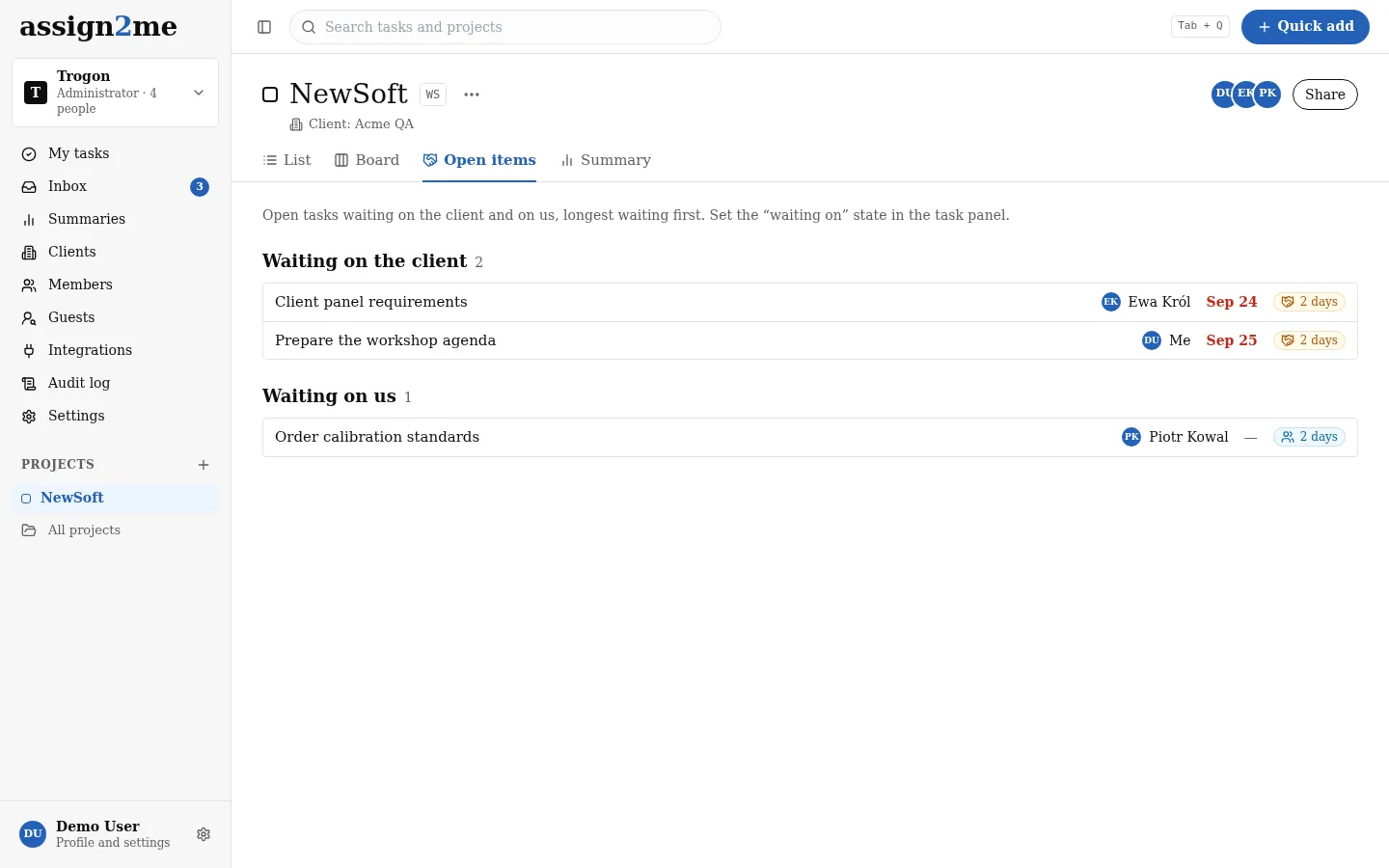
Every task says who it is waiting on — the client, you or a third party — and for how many days. The Open items view lists what waits on the client and what waits on you, longest first. That is the list that lives in a spreadsheet next to Jira in most software houses.
People outside development don't get lost
A task is a title, one owner and a due date in words. My tasks gathers everything from every project in four groups: New, Today, Next, Later. There is nothing to configure before the first project.
Developers keep their flow
The task key in a branch name or a pull/merge request title links the code to the task, and a merge can close it. Developers stay in GitHub, GitLab and the terminal; the client sees the task, not the repository.
One plan, one price
Every feature for €19 a month for up to 5 people, +€3.50 for each additional person. No tiers and no seats sold in packs.
A VAT invoice for every period
Electronic, made out to your company; Polish companies receive it through KSeF, without accounting for an import of services.
Data in the EEA, DPA in the app
On every plan, because there is one plan.
Jira and assign2me side by side
Monthly prices for the same team, and what each tool does.
| Jira and assign2me side by side | Jira Standard | assign2me |
|---|---|---|
| 5 people / month | €43 | €19 |
| 10 people / month | €86 | €36.50 |
| 20 people / month | €173 | €71.50 |
| What it is | Issue tracker for developers | Task list with the client as a guest |
| Free plan | Up to 10 users, no guests | 30-day trial, no card |
| Client (guest) | Up to 5 free per paid seat, from Standard; one space per guest, narrowed by permissions | Unlimited and free; sees only their tasks; signs in with an email link |
| “Waiting on client” with days | — (a custom field or an app) | Built in, with an Open items view |
| Sprints, backlog, story points | ✓ | — |
| Custom workflows and fields | ✓ | — (a fixed set, plus priority) |
| Timeline / roadmap | ✓ | — |
| GitHub and GitLab | ✓ | ✓ |
| Slack | ✓ | ✓ |
| AI assistant over MCP | ✓ (Atlassian Rovo MCP Server) | ✓ Claude Code, Claude, ChatGPT |
| Native mobile apps | ✓ | — (mobile browser) |
| VAT invoice through KSeF (Poland) | — | ✓ |
| Data location | EU on Standard and above | EEA |
Jira Standard: list price per seat excluding VAT, billed monthly, in USD, converted at 1 USD = 3.92 PLN, 1 USD = 0.89 EUR as of 9 November 2026; we count the seats you pay for. assign2me: billed monthly; on the annual plan you pay 10/12 of that. Prices and plans checked on 9 November 2026.
Moving from Jira
- In Jira, export the issues of a project to CSV (from the issue search: Export → CSV).
- In assign2me, open the project and choose Import from CSV.
- Check the column mapping: Summary goes to Title, Description, Assignee, Due date and Status to their fields. Map a component or the board column to Section if you want them as sections.
- Check the preview and import. Every imported task says “import” in its history.
Invite your team first: people are matched by email. Comments, attachments and sprints don't come across — only the tasks.
Questions
Can developers keep working in GitHub or GitLab?
Yes. Put the task key (for example ACME-12) in a branch name or a pull/merge request title and it shows on the task. A merge can close the task if the project has that turned on.
Can we use Jira for development and assign2me for the client?
You can, but you will keep two lists in sync by hand. Teams that do it usually leave the sprint work in Jira and move client-facing work and rollouts to assign2me. We don't sync the two.
Does my client need an account or a password?
No password and nothing to set up. The account comes from your invitation and the client signs in with a link from an email.
What happens to our data if we leave?
An administrator downloads the whole organization — projects and tasks as CSV and JSON, with attachments — at any time.
Other comparisons
Asana alternative · Trello alternative · Pricing and a comparison with five tools
Jira, Confluence and Atlassian are trademarks of Atlassian.
Everything for one price
30 days free. Then €19 per month excl. VAT for a team of up to 5, each additional person +€3.50. Client guests: unlimited and free.